iPhone and Exchange - push and DNS
It seems lot of folks are having problems getting Exchange push email working reliably with the new iPhone 2.0 software. For me, it worked flawlessly when I was outside of the office, but when I was in the office and connected to our corporate LAN via wi-fi, it was unreliable at best. If I instead connected to another wi-fi network (like the guest network from the folks two floors below us), everything worked fine.
There is an Apple KB article talking about this:
When roaming between home and office networks with Wi-Fi enabled, “push” may stop working if your company’s Exchange ActiveSync server has a different IP address for intranet and Internet clients. Make sure the DNS for your network returns a single, externally-routable address to the Exchange ActiveSync server for both intranet and Internet clients. This is required so the device can use the same IP address for communicating with the server when both types of connections are active. A workaround to avoid this issue is to disable Wi-Fi on the iPhone.
Yep, that sounded like the problem. Our internal and external DNS for our corporate mail server is different, just as the article surmised. But it turns out in our case, it was non-trivial to change them to be the same thing.
But it turns out there is a workaround that works for me. If you go into Settings / Wi-Fi, find your wi-fi network, and click the blue button next to it, you’ll see something like the following:
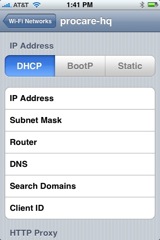
And here’s the tricky part. Tap on the “DNS” setting, and edit it. In my case, rather than using the internal DHCP-assigned DNS servers, I typed in two external DNS servers. These new servers will override whatever is returned from DHCP, and when asked for the IP of our mail server, they will return the externally-facing IP, since that’s all they know about.
And that was it! The push email is now working 100% reliably. A little too reliably, actually. :-)
Note - I obviously no longer have internal DNS resolution within my corporate LAN, but that’s not a problem for me. Your mileage may vary.
Note 2 - this also assumes your external mail server IP is accessible from your LAN. This may or may not be the case, depending on how your firewalls and the rest of your network are configured.