It seems lot of folks are having problems getting Exchange push email working reliably with the new iPhone 2.0 software. For me, it worked flawlessly when I was outside of the office, but when I was in the office and connected to our corporate LAN via wi-fi, it was unreliable at best. If I instead connected to another wi-fi network (like the guest network from the folks two floors below us), everything worked fine.
There is an Apple KB article talking about this:
When roaming between home and office networks with Wi-Fi enabled, “push” may stop working if your company’s Exchange ActiveSync server has a different IP address for intranet and Internet clients. Make sure the DNS for your network returns a single, externally-routable address to the Exchange ActiveSync server for both intranet and Internet clients. This is required so the device can use the same IP address for communicating with the server when both types of connections are active. A workaround to avoid this issue is to disable Wi-Fi on the iPhone.
Yep, that sounded like the problem. Our internal and external DNS for our corporate mail server is different, just as the article surmised. But it turns out in our case, it was non-trivial to change them to be the same thing.
But it turns out there is a workaround that works for me. If you go into Settings / Wi-Fi, find your wi-fi network, and click the blue button next to it, you’ll see something like the following:
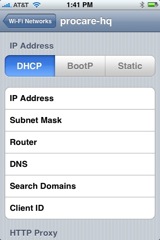
And here’s the tricky part. Tap on the “DNS” setting, and edit it. In my case, rather than using the internal DHCP-assigned DNS servers, I typed in two external DNS servers. These new servers will override whatever is returned from DHCP, and when asked for the IP of our mail server, they will return the externally-facing IP, since that’s all they know about.
And that was it! The push email is now working 100% reliably. A little too reliably, actually. :-)
Note – I obviously no longer have internal DNS resolution within my corporate LAN, but that’s not a problem for me. Your mileage may vary.
Note 2 – this also assumes your external mail server IP is accessible from your LAN. This may or may not be the case, depending on how your firewalls and the rest of your network are configured.
An alternate approach that may work for many (it does for us at the Denver Art Museum) is to simply point the iPhone at the external IP address / host name for Outlook Web Access. True, on the internal LAN you’re going to take a trip outside to get to the internal server, but it should always work.
My exchange activesync is not pushing. I’m using the gen 1 iPhone but have the new softward. Is push for exchange only supported while on wifi or does it work via Edge as well? I have yet to see it actually push anything, it doesn’t update until I actually open mail or contacts or calendar etc.
@Rob – it definitely works over edge…sounds like there might be some config problems on your Exchange Server?
On the Windows server:
Start > Program Files > Administrative Tools > DNS
Right click on Forward Lookup Zones and choose New Zone
Click Next, leave Primary Zone selected and click Next
Leave “To all domain controllers…..” and click Next
In “Zone Name”, type your mail server (ie: mail.domainname.com) and click Next
Leave “Allow only secure…..” and click Next
Click Finish
In the Forward Lookup Zones pane on the right, double click the new zone and then right click in the empty area and choose New Host (A)
Leave the name blank and enter the IP address of your internal mail server (ie: 192.168.1.xxx) and select create PTR record, then Add Host
Click Start > Run, type CMD and in then type ipconfig /flushdns
That should be it…
Worked Like a chram..Thanks
@MacITSolutions – I don’t think that will get around the problem of having different IPs for internal and external networks.
Just stumbled across this discussion. Bruce’s original suggestion worked for us perfectly.
Overriding the DNS on the WIFI setting to point to an external DNS server solves it. Thanks!
Is there a way to get my work email, that normally goes to my blackberry via T-mobile Exchange, pushed to my iphone via AT&T without letting my work know?
I had the same issue since I installed Exchange 07 and the external OWA address had changed. Once I figure out how to change that back to normal I should be ok, BUT: I followed the original suggestion about changing the DNS numbers. However, I did not use an “external” rather I used my internal router IP of 10.x.x.1, which already has the static DNS’s set up in the WAN settings.
Question for Mac IT Solutions, how does this help and does he mean to do this on the primary DC or on the exchange server which is running OMA/Activesync?
I’ll give it a try though I can’t see how this will help anything, mail server was resolvable it’s just push email that’s not working.
I read on another forum that the reason that OMA push email works so well is down to the fact that exchange relies on the connections being slow between your iPhone and the server.
I’d be interested to know if push email works over wireless for any phones. I can sync my email well enough over the wireless it’s just the push notifications I’m not getting.
I honestly don’t see why it has to be an externally resolvable server IP address for this work properly. Very strange…
Anyway I’ve done what Mac IT solutions has suggested for now, maybe the Host A creates and authoritive answer for the iphone to go “oh I really am meant to be using this address not some external one”.
Anyway thanks for the info guys.
I have an internal mail server
150.2.55.48 mail.domain.co.uk
externally it is
192.9.62.24 mail.domain.co.uk
from the external www, I can access my server via the web no problem, internally, my dns resolves mail.domain.co.uk as the external address and does not work.
How do I add an entry to the internal dns server to point to the internal address and not the external one?
Thanks
Thanks for the help. Worked perfectly.
Pingback: iPhone & ActiveSynch « technoDAVE
Just found this article after fighting with my new Iphone for a bit. Was exactly the issue, we have different external/internal IPs and I was on wifi. To bad I can’t change our network setup and will have to go without wireless while in the office.
I had the exact same problem as the article author. His fix worked for me, but I modified it slightly to be able to continue to resolve internal names in my split-DNS infrastructure. My server is accessible at mail.mydomain.com. Externally that is 5.6.7.8, for example, but internally it is 1.2.3.4.
Push was working externally, but not internally over wifi.
To address the issue, which may be what MacIT was suggesting, I added an A record to my internal DNS pointing iphonemail.mydomain.com (a new name I just made up) to my external IP, 5.6.7.8 instead of the internal one. I added it externally as well.
Now, iphonemail.mydomain.com resolves to 5.6.7.8 both internally and externally, so push works inside the LAN or on the internet. The benefit here is that I can still access my internal servers on the iphone while connected to my lan.
As the author pointed out, this will only work for you if you can reach your external IP internally. I am using ISA Server 2006, if that helps.
As Debello encountered, you also of course have to be able to add A records.
I’m a happy camper now :)
@Chris – sounds like a good idea! I might do that myself. The only downside that comes to mind is you’d need an SSL certificate for iphonemail.mydomain.com…
@gregr, you are correct. I have a wildcard cert that I got from RapidSSL. They are only $199. So *.mydomain.com has been secured for quite some time. Wildcart certs NOW cost what REGULAR certs USED to cost! Totally worth it in my book.
http://www.rapidssl.com/index_ssl.htm
These dns solutions will only work if your router/firewall is configured to support NAT loopback. Some lower/mid-range consumer devices don’t support it at all.
I am having a problem getting new contacts to push to my iPhone. When I setup my email it loads contacts, mail items, and calendar items perfectly. The Exchange Server also pushes calendar events and email over perfectly….. HOWEVER, it will not push NEW contacts over to my iPhone. ie: If I add a contact in Outlook, it does not push the contact to my iPhone. It DOES add the contact to my Exchange Server though. What is even more interesting, is that if I add a contact in my iPhone, it WILL add that same contact into my Outlook. If I add my contacts through the Webmail Exchange Server, it will add the contact to both Outlook and my iphone.
How can I configure this properly so that when I add new contacts in Outlook it pushes it to my iPhone?
One last thing, is that I am also not able to access my Global Address Book from my iPhone that sits within my Outlook. The option on my iPhone appears under the “Groups” in my “Contacts” but when I click on it there aren’t any names that appear. Any suggestions?
I got around this issue in a different way and this information may be of help to some of you.
As some routers/firewalls don’t allow you to NAT loopback what you can do is create a new zone in your internal DNS with an ‘A’ record for mail.mycompany.com with the INTERNAL IP of your exchange server. (Assuming your normal internal domain is mycompany.local or similar so is different to your external domain name)
So basically when on corporate Wifi mail.mycompany.com resolves to the internal IP and when external to the system it resolves to the external IP. You will have to create the other records for www and the like as your internal DNS server will think it’s responsible for the domain (even though it may really not be).
mail.mycompanyname.com will be the server used in the Activesync configuration.
MK
@MK – your proposed configuration is exactly what _causes_ the problem I described. If you read the KB article I linked to, it calls out this configuration specifically as an issue.
Hi, I found this website as i have had same issue as everyone else.
Software / Hardware:
HP Proliant 110ML
ESX server 4.1 Build 260247
8 Gig RAM
500 Mb Disk
Mailserver
Windows 2008 R2 4 Gig ram
Exchange 2010
——–
Problem description:
When on LAN i can’t sync my Iphone 4.1 with the exchange server. Push does not work and error “Cannot Get Mail – The connection to the server failed”.
My setup is an Router which sits on 192.168.0.50 and the WAN DNS is set to Opendns IP address.
Solution:
I relized that the issue is down to DNS, suggestion to use the external DNS seems that it has not worked for me at all. I found that if i use the internal DNS which is 192.168.0.9 than the sync works just fine.
I hope this helps somone who has the same issue.
Thank you
Essa Moshiri
@MACIT, Worked well for me mate, was just missing the ptr, thanks for the help.
Hi:
I have read through some of this thread as my system has suddenly stopped doing the push thing to my iphones (3G running IOS 4.2.1) from yesterday after the server crashed. I have run through my server config and nothing has changed (Exchange 2003 running on 2003SBS SP1). So I still have some work to do!
However, I have set up split DNS on our server, so that whether I connect internally via wifi or externally via 3G, I always connect to the same host – and that has worked perfectly up until yesterday. So it might be something to consider – and it is not hard to do. I found a useful reference site at URL: http://www.amset.info/netadmin/split-dns.asp
Cheers.
Having pottered around a bit, I discovered that it is always the obvious things that we overlook – anyway, we use DynDNS, and as a result of the crash last night, one of our servers, you guessed it, the Exchange server, did not update its IP address. I found that out when I tried to run OWA externally. So, always check IP addresses – that’s where the screw-ups happen – a lot :)
Cheers :)
@MACIT worked great for me after I created a .pac file and set my proxy to auto (with a exception for local addresses) as I use a proxy server.
I originally added a host(A) record for address to the correct dns zone which was hosted on another DNS server. My DNS is confgured to forward any unknown requests to this server. It resolved correctly via NSLOOKUP but the Mail client (Exchange) would not confgure until I created the absolute DNS zone with pointer record on my local DNS server,
MACIT, is there any specific reason why is failed when the I was using a DNS forwarder for the zone?
Andy