Hot out of the RAI lab…RSS feeds generated from Visual SourceSafe. Many development shops use some kind of email notification for source changes – and this is a perfect application of RSS. Here’s a screen shot in NewsGator with Outlook 2003:
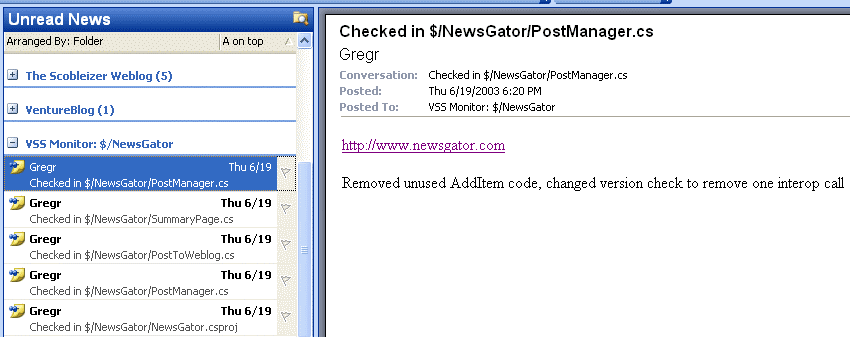
This currently runs as a Windows service, and periodically generates the RSS file(s). To get it running, do the following:
1. Download (msi or zip) and install the service. When you install, make sure you enter in a user account that has permission to access the directories where your VSS data lives.
2. Edit the config.xml file in the installation directory. It should be pretty self-explanatory.
3. Start the service from the service control manager.
Post comments here – I’d love to hear your thoughts. Also, I’m not sure what the final disposition of this code will be (free, part of another product, etc.)…so this build will expire on August 1.
Will this work with Outlook 2002?
Sure! It’s a “regular” RSS feed…so it will work with any aggregator. It was just a good opportunity to throw in another screen shot of NewsGator with Outlook 2003. :-)
Ok.. I installed it and I *think* I got it configured and started correctly… but I can’t see that it’s actually doing anything. What should I be looking for, besides the XML file gettting created?
I should really learn to be more patient… It just took a minute to produce the feed. Very cool!
Is there any way I can configure it to only display checkins by a particular user?
What are the units for the Interval element (hours?, minutes?, days?)
You can’t configure for a particular user’s activity – seems like a good idea, though. I’ll add it in.
And the interval units are in minutes.
Pretty cool! Greg Reinacker has a Windows service that generates an RSS feed from updates to a Visual Source Safe database. I haven’t given it a try yet, but it looks like it’s going to be a pretty cool program to help in allowing groups of individuals working on a project to keep track of updates across the development team!…[more]
Since I am having setup problems, how about an entry with some diagnostic info?
I did something similar with the Mantis bug tracking software http://mantisbt.sf.net/ to create RSS feeds of the current bugs/issues we’re tracking.
When it shows items which have been deleted, it only shows the directory, and not the file name of the file. Any way around that?
Eric – yeah, that’s annoying isn’t it! This info is actually not exposed via the VSS API (there’s a KB article somewhere talking about it). We’ll eventually add some more code to scan for differences and provide this information…no ETA on that yet.
The original code I had postedto generate RSS feeds from a VSS database has expired…[more]
Yet again, the code I posted to generate RSS feeds from Visual SourceSafe has expired…I’ve posted a new version that…[more]
I had problems (“The account name is invalid or does not exist”) installing on a W2000 system.
I changed the windows username to machinename\username and it installed properly.
VSS in RSS is a great idea, but not as a Windows NT Service. Why not create an ASHX IHttpHandler which collects changes from the VSS database upon request and use caching to limit the burdon on the database to once every 10 minutes? The QueryString can be used to determine parameters.
Victor, I originally had the same thought…but there are some security-related issues that make that solution less than ideal. Can you elaborate on why you don’t like it as a Windows service?
You mention that other shops use email notification. Do you know how to setup this, or know who does? Thanks
No, I don’t…but you might try google for “sourcesafe email notification” or something along those lines.
omg, this rocks. i’ve tried some lame email notification software for the same purpose (cryptomonkey and a couple others), but they don’t watch an entire VSS tree — you have to enter each file one at a time! And RSS just makes so much more sense. Can’t believe this is free. You rock. I’m gonna send all my friends here.
Hi Greg,
Great idea! I can’t seem to get it to work, though. When I start the service, this message is written to the Event Log and an xml feed is never written to disk:
Exception occurred generating RSS.
VSS Database: D:\vss\srcsafe.ini
VSS Project: $/workbench/generator/current
Exception:
The specified module could not be found.
at VssRssSvc.GenRss.BuildRss(String srcSafeIniPath, String vssUser, String vssPass, String projectName, String outputPath, Int32 maxItems, Boolean recursive)
Any ideas?
Thanks very much…
I have installed your app, configured the XML, setup the service and it finally produced an XML feed. There seems to be an issue, there are no new XML feeds only the original, I have the interval set to 60 and nothing happens. The VSS base is quite big, we have 15 developers working on a lot of projects, could it be timing out. Also since the install we are getting random locks on some of our files. Any suggestions would be appreciated.
I’ve tried installing this on Win 2000 and Win XP. After it asks for a username and password, I always get the response that the account does not exist or the password is wrong, even after double and tripple checking the account and password. Any ideas??? I’ve written and installed .NET services in the past, but have always used the account “localsystem” in the service installer.
This is an excellent example. Thank you!
Really makes you think!
Greg,
You’re program is amazing. However, I am experiencing problems getting it to connect and run with a db that is installed on a Novell server. Below is the msg captured from my event log:
Exception occurred generating RSS.
VSS Database: \\server1\net_1\vss\sourcesafe\srcsafe.ini
VSS Project: $/
Exception:
The SourceSafe database path admin does not exist. Please select another database.
at SourceSafeTypeLib.VSSDatabaseClass.Open
(String SrcSafeIni, String Username, String Password)
at VssRssSvc.GenRss.BuildRss(String srcSafeIniPath,
String vssUser, String vssPass, String projectName,
String outputPath, Int32 maxItems, Boolean recursive)
Is this caused by the fact that I am trying to get it to connect to Novell db (I have admin privelages to both the local machine and Netware server).
Here is my config file:
1
\\Server1\NET_1\VSS\SourceSafe\srcsafe.ini
jwhite
omitted
$/
true
S:\inetpub\wwwroot\dept\scm\rss\vss.xml
250
< ?xml version="1.0" encoding="utf-8" ?>
Any help would greatly be appreciated?
Greg,
You’re program is amazing. However, I am experiencing problems getting it to connect and run with a db that is installed on a Novell server. Below is the msg captured from my event log:
Exception occurred generating RSS.
VSS Database: \\server1\net_1\vss\sourcesafe\srcsafe.ini
VSS Project: $/
Exception:
The SourceSafe database path admin does not exist. Please select another database.
at SourceSafeTypeLib.VSSDatabaseClass.Open
(String SrcSafeIni, String Username, String Password)
at VssRssSvc.GenRss.BuildRss(String srcSafeIniPath,
String vssUser, String vssPass, String projectName,
String outputPath, Int32 maxItems, Boolean recursive)
Is this caused by the fact that I am trying to get it to connect to Novell db (I have admin privelages to both the local machine and Netware server).
Here is my config file:
1
\\Server1\NET_1\VSS\SourceSafe\srcsafe.ini
jwhite
omitted
$/
true
S:\inetpub\wwwroot\dept\scm\rss\vss.xml
250
< ?xml version="1.0" encoding="utf-8" ?>
Any help would greatly be appreciated?
I’m interested in this but I can’t get past the install… keeps insisting the username+password I give it for the service are incorrect (“either account doesn’t exist or password is incorrect”). But they are definitely correct ones. One wrinkle is that we use Novell here… I wonder if that has any effect? Hmm…
Solved my own problem by consulting one of the other posts about this tool… needed to put the username in as domain\username.
a
I am stuck half way in an install.
It keeps telling me that “The specified service has been marked for deletion”. Then the installation stops.
Any ideas where in the registry I could find the service to delete it?
Thanks
Mathias
I while back, I wrote an application to generate RSS feeds from Visual SourceSafe databases. The code was set to expire…[more]
Excellent! A great way to get an RSS feed that you can use to track what other developers are doing to your code base! From RSS and SourceSafe .: QUOTE I while back, I wrote an application to generate RSS feeds from Visual SourceSafe databases….[more]
Download links doesn’t work any more.
Download links still not working
Download link above is broken. Can you point me to the correct download link. thanks
Will this work with VSS 7?
For those who the link is broken, go to the post from Greg titled RSS and SourceSafe on 11/22/2004. He’s got a link in that post to the source code where you can download the source.