iPhone template for Delicious Library 2
One of the first Mac apps I bought was Delicious Library. Not that I desperately needed it, but it was just too darn pretty not to buy, especially for a new Mac owner to use to show his friends. And when version 2 came out, I was super excited about being able to publish my library on the web.
Here’s my use case. I travel a lot, and I like to read books on the plane, rather than do my usual work…somehow I feel more relaxed when I arrive to where I’m going. Anyway, so I’ll be in the book store in the airport, and I’ll see an interesting book. But if it’s not a new release, then I often can’t remember whether I’ve read it before; I know I like the author, and I know I’ve read a lot of his work, but not positive about this particular book.
So DL2 and the iPhone to the rescue, right? Pull up my library, do a quick search, and I’d be all set. But herein lies the problem.
The out-of-the-box templates can be seen on Adam Betts’ blog. While pretty, here are the issues with the iPhone templates, at least for my particular use case:
1. There are only 12 books per page. Yikes - that means I have 20-some pages, and I’m not sure which page I need to go to. Or with the other template, all the books are on one page - which is nice, but leads to problem #2.
2. See all those pictures of the book covers? Those are coming to about 90KB each. Each! That means a page of 12 books is over half a meg. That’s a lot on a phone.
3. I don’t need the book descriptions and links to Amazon in there either. Those are pretty big also, although down in the noise compared to the image sizes.
What I really wanted was one page with all my books, or at least 100 or so of them, and have the page be small enough that I could load it over EDGE without having to sit down. I’d like search features too, and I’d like to be able to sort by author’s last name (so Tom Clancy would be before Brad Meltzer), but hey, there are bigger problems to worry about.
While I was browsing around, trying to figure out a way around this problem, I saw Mark Burgess’ site, and he had some sample templates. While his template wasn’t what I wanted, it showed me how to make one. So I worked on it for a bit, basically just modifying the one that ships with DL2, and this is what I ended up with:
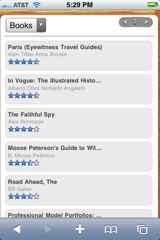
Over 200 books on one page, and it’s coming in at just over 200KB including the images on the page. Now that I can live with!
As to how to install it…it’s not super easy. Here’s what you need to do:
1. Install Mark Burgess’s HTML template, and install it per his instructions (in the readme file).
2. Download my changes, and replace the files in the “iphone” directory in Mark’s template with the contents of this zip file.
No warranty, of course…this is at the “it seems to work for me” stage. :-)
If there is some documentation somewhere about how to make DL2 templates and get them installed without resorting to such hackery, I’d love to know about it, and then I can make this into a real template.
Anyway - hope this is helpful for someone!